Alo Yoga Jackets: Verify Pack Volume vs. Billable Weight
When consolidating two [Alo Yoga jackets](https://fashion-reps.net/jackets/alo-yoga) in different colors, do not start by directly comparing route prices. Instead, record the product identity, packaging plan, actual weight, volumetric weight, billable weight, and final payment terms separately, then check routes using the same destination and query time. This helps determine whether volume changes truly affect route selection and avoids mixing product price, packaging fees, and international shi
- Published
- Editors
- Nathaniel Brooks · Editor-in-Chief and Founder
- Record updated
- Editor score
- 4.2 / 5
When consolidating two Alo Yoga jackets in different colors, do not start by directly comparing route prices. Instead, record the product identity, packaging plan, actual weight, volumetric weight, billable weight, and final payment terms separately, then check routes using the same destination and query time. This helps determine whether volume changes truly affect route selection and avoids mixing product price, packaging fees, and international shipping costs.
First Confirm Whether the Two Jackets Belong to the Same Product Record
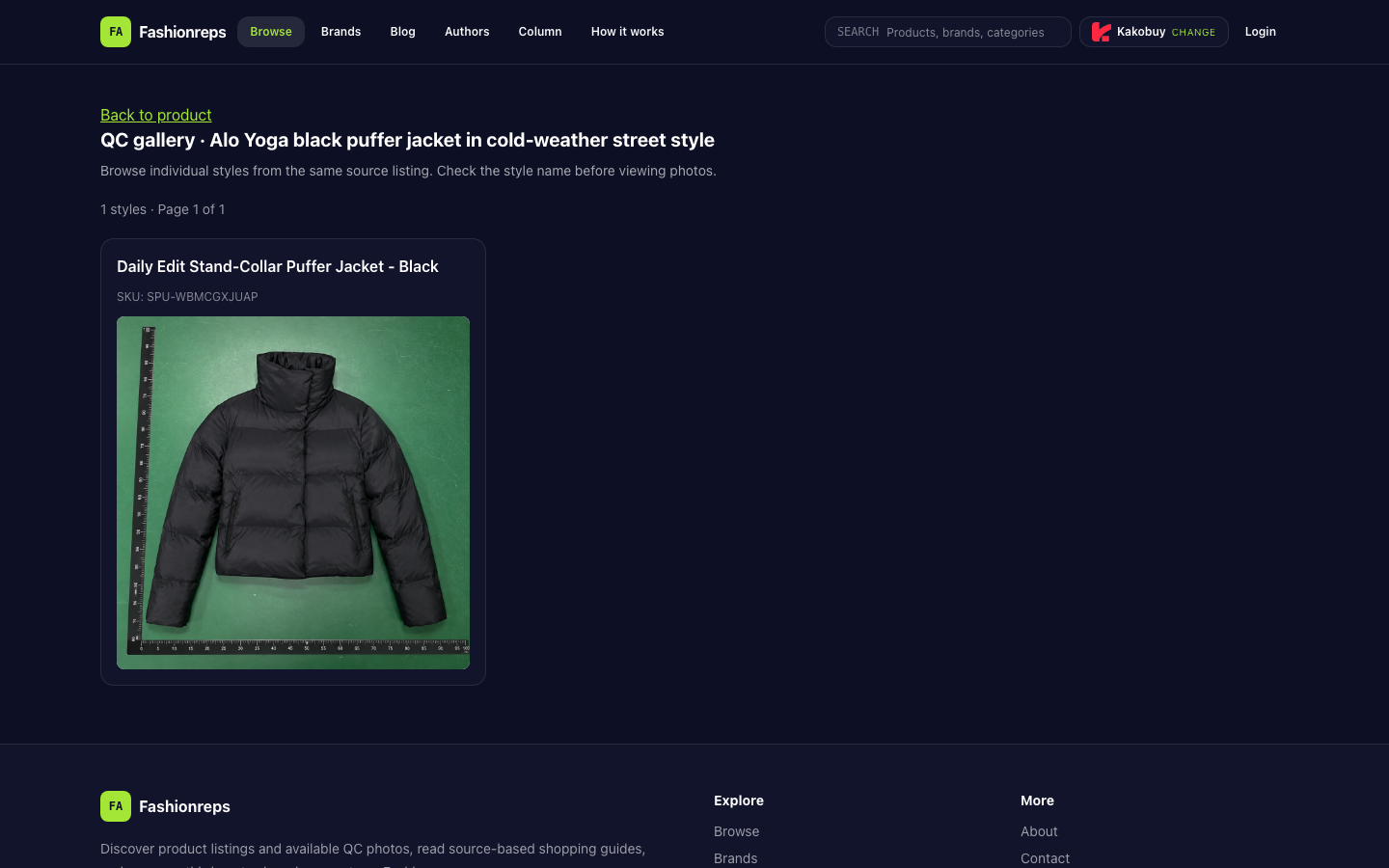
Current verifiable page evidence shows that the black version corresponds to the Daily Edit Stand-Collar Puffer Jacket - Black on the Fashionreps QC page, with SKU SPU-WBMCGXJUAP. This evidence only confirms the page identity of the black version and cannot be used to infer the white version's SKU, size inventory, price, or packaging dimensions. Before consolidation, save the product page, color, size, and quantity for each jacket separately.
It is recommended to first create a product record:
- Black jacket: page name, color, size, quantity, SKU or page identifier.
- White jacket: page name, color, size, quantity, SKU or page identifier.
- Whether both items have been received at the warehouse and have completed inspection.
- Date, time, and time zone of the page query.
- Page screenshots or traceable order/warehouse records.

This image can only serve as a source record for the black version's page identity; it cannot prove the white version's product information, nor the weight, volume, or shipping cost after consolidating the two jackets.
Measure the Two Packaging Plans Separately
At minimum, confirm two plans with the warehouse or packaging page: keep original packaging, and use standard packaging or remove unnecessary outer packaging. If the platform does not display a particular packaging service, fee, or dimension, mark that item as "to be confirmed" and do not fill in any amount on your own.
Record the following data for each plan:
| Item | Keep Original Packaging | Standard or Adjusted Packaging |
|---|---|---|
| Packaged length, width, height | To be measured | To be measured |
| Packaged actual weight | To be measured | To be measured |
| Volumetric weight calculation rule | Per route page | Per route page |
| Billable weight | Per route page | Per route page |
| Packaging or handling fee | Per page display | Per page display |
| Is this plan selectable | To be confirmed | To be confirmed |
Do not use single-item page dimensions to replace the outer box dimensions of the consolidated package. The stacking, compression, filler, and carton size of two jackets can all change volumetric weight; without post-packaging data, you cannot determine which plan is definitely cheaper.
Distinguish Actual Weight, Volumetric Weight, and Billable Weight
Actual weight is the weighing result, while volumetric weight is calculated based on the length, width, height, and conversion rule used by the route. Billable weight typically uses the weight metric required by the route's rules, but different routes may have different calculation methods, rounding rules, and minimum billable weights. Therefore, you cannot use a weight shown on one platform to infer all routes.
When verifying, transcribe the following fields one by one:
- Packaged length, width, height, confirm whether the unit is centimeters or other units.
- Actual weight, confirm whether it is grams, kilograms, or pounds.
- Volumetric weight or calculation formula provided on the route page.
- Billable weight and its rounding rule.
- Whether there is a minimum billable weight, first weight and additional weight thresholds.
- Whether fuel surcharges, remote area fees, or other handling fees are included.
If the route page only shows a total price without specifying billable weight, packaging fees, or additional conditions, keep that price as a page quote record, but do not interpret it as a verifiable final cost.
Compare Routes Using the Same Conditions
When comparing, you must fix the destination, delivery area, package weight metric, and query time. Also record whether the route accepts jacket-type clothing, whether there are size restrictions, whether additional declaration is required, and who bears taxes. Without these conditions, even if two quotes have different numbers, you cannot determine whether the difference comes from volume, route, or other fees.
It is recommended to check in the following order:
- First enter the keep-original-packaging plan, record the route name, billable weight, shipping cost, delivery time, and restrictions.
- Then enter the standard packaging plan, using the same destination and the same route filter conditions.
- If a route appears only under one packaging plan, record it as a change in route availability, not simply a price change.
- Save the query date, query time, and screenshot for each quote.
- Record exchange rate, payment processing fee, packaging fee, and taxes separately; leave items not shown on the page blank and note "not provided".
Only when both plans have post-packaging dimensions, actual weight, billable weight, and complete fee conditions can you compare total costs. If any key item is missing, stop drawing specific monetary conclusions and only state what data still needs to be supplemented.
When Volume Affects Route Selection
You can check using three levels of judgment:
First, compare whether the billable weight changes between the two packaging plans. If actual weight is the same but billable weight increases, it indicates that the outer box volume may have become a billing factor; but still base this on the route's publicly stated calculation rules.
Second, check whether available routes change. If the larger-volume plan cannot use a certain route, or triggers size restrictions, then volume affects not only shipping cost but also route selection.
Third, break down the total cost. Total cost should at least separate product amount, service fees, payment fees, packaging or handling fees, international shipping cost, exchange rate conversion, and tax terms. Currently no official calculator results have been provided for these items, so we cannot give a specific total price, savings amount, or optimal route for the consolidated two jackets.
Final Record Before Payment
Before confirming the return, save a final version including:
- Color, size, quantity, and page identity of the two jackets.
- The chosen packaging plan and post-packaging length, width, height.
- Actual weight, volumetric weight, and billable weight.
- Destination, route name, and query time.
- Whether product amount, service fees, payment fees, packaging fees, and international shipping cost are listed separately.
- Exchange rate source, payment processing fee, and tax responsibility terms.
- Quote screenshots, and whether the page states validity period or other restrictions.
If the white version's identity, consolidated dimensions, route rates, or additional fees are still not confirmed by page or warehouse records, do not write the post-consolidation amount as a definite result. First gather the evidence, then re-verify using the same set of fields to determine whether volumetric weight changes route selection and actual cost.
Community feedback (0)