How to Check Stone Island Listings for Info Mismatches
When browsing Stone Island items on [fashionreps](https://fashion-reps.net/), if the title, color, size, images, or external links don't match up, the safest approach isn't to order based on a single photo—it's to first note down the inconsistencies, then determine whether they are display field issues, source link issues, or order issues that need verification with the platform or shopping agent. 🧭 This article focuses on one specific task: troubleshooting inconsistent product page information
- Published
- Editors
- Nathaniel Brooks · Editor-in-Chief and Founder
- Record updated
- Editor score
- 4.2 / 5
When browsing Stone Island items on fashionreps, if the title, color, size, images, or external links don't match up, the safest approach isn't to order based on a single photo—it's to first note down the inconsistencies, then determine whether they are display field issues, source link issues, or order issues that need verification with the platform or shopping agent. 🧭
This article focuses on one specific task: troubleshooting inconsistent product page information. After reading, you should be able to compare page fields, preserve evidence, and decide whether to proceed with purchase or pause. This article does not cover refund disputes after payment, warehouse QC judgments, or logistics loss handling.
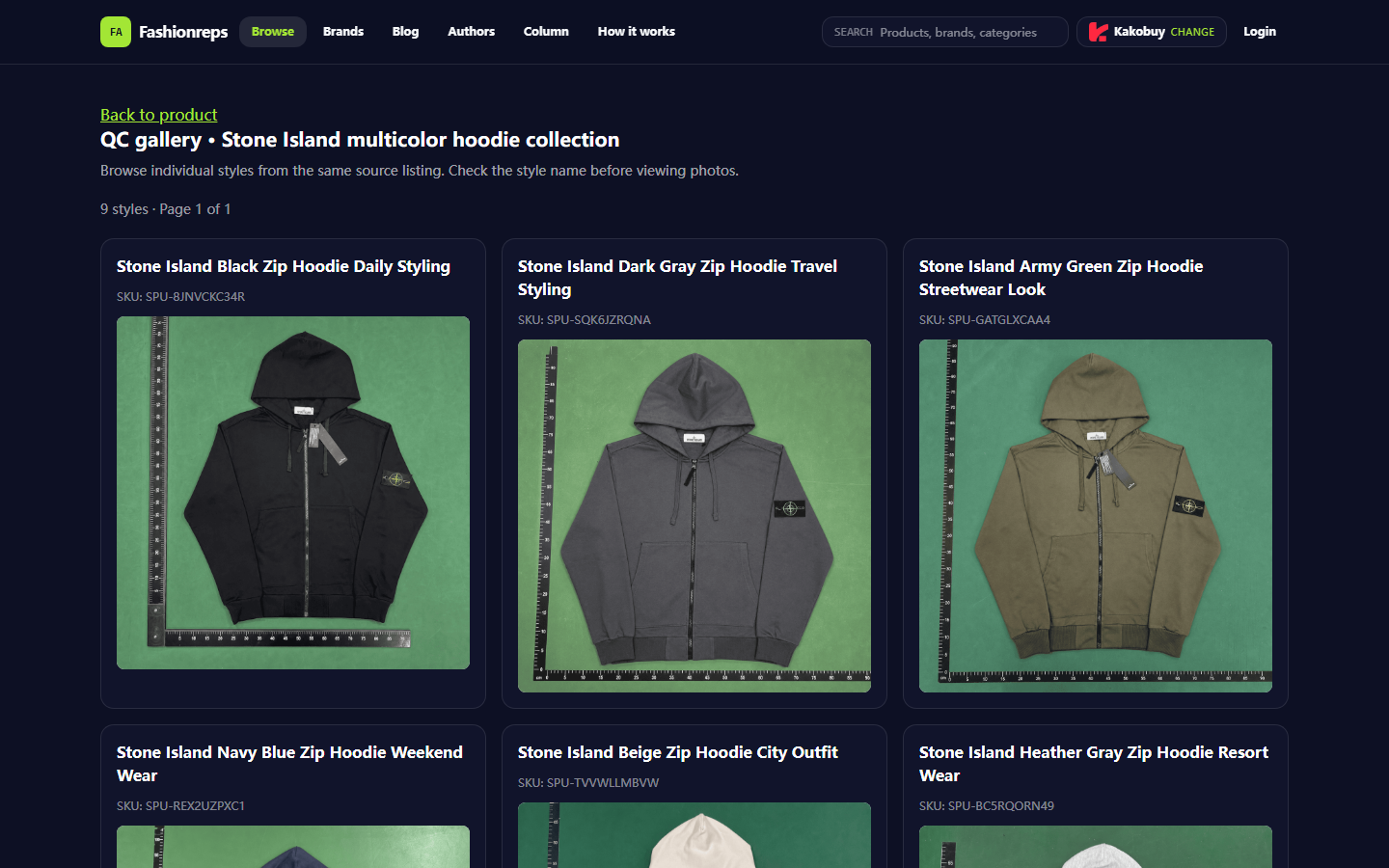
The sample page verification date used in this article is October 16, 2026. The sample comes from the QC page for multiple Stone Island hoodies on fashion-reps, which shows 9 styles from the same source, with style names, colors, SKUs, and QC image links listed separately. This sample only illustrates the troubleshooting method and does not prove that all Stone Island pages use the same fields or statuses.

What Problem Does This Troubleshooting Solve
Common issues: the product title states one color, but the thumbnail looks like another; the size information on the page differs from the external link; multiple similar styles from the same source, and after clicking, it's hard to confirm which image corresponds to which SKU; or the page still opens, but the product fields on the linked page have changed.
These issues don't necessarily mean there's a problem with the product itself. They could be due to style merging, image reuse, delayed field updates, changes on external pages, or different display scopes across pages. The goal of troubleshooting is not to immediately judge "authentic" or "fake," but to confirm whether the specific style you intend to buy has enough consistent evidence to support the next step. 🔍
First Confirm the Visible Product Page and Fields on fashionreps
Start by recording the following information from the fashionreps page, not just saving the browser URL:
- Page title and full product name
- Brand, style name, and color description
- Visible size range or size chart
- SKU, product number, or other page identification fields
- Whether the main image, detail images, and QC images belong to the same style
- Page update time or status shown on the page
- Shopping agent selection status that the Buy button points to
The sample page shows that multiple Stone Island hoodies are split into different style names, such as Black Zip Hoodie, Dark Gray Zip Hoodie, Army Green Zip Hoodie, etc., each with its own SKU. When comparing, treat the style name and SKU as a pair, not just the color word. Similar color names, similar image backgrounds, or reuse of image sets from the same source can lead to misjudgment.
When recording the page, it's recommended to use the following format:
| Check Item | fashionreps Page Record | Content Needing Further Confirmation |
|---|---|---|
| Style | Full style name shown on page | Whether the external page still corresponds to the same style |
| Color | Visible color in page text and images | External page color field, option values, and images |
| Size | Visible sizes or size chart | Whether same size options and measurement units exist |
| Identification | SKU or product number | Whether the same identification field is retained after redirect |
| Evidence | Main image, detail images, QC images | Whether the images actually belong to the current style |
How to Compare Product Title, Color, Size, and Images Item by Item
First Compare Title and SKU
The title should clearly indicate the specific style you are viewing. If the title only says "Stone Island Hoodie" while the image area or the same page shows multiple colors and multiple SKUs, you cannot treat the entire page as a single product.
Prioritize checking:
- Whether the fashionreps page title includes style and color.
- Whether the SKU corresponds to only one style or is shared by multiple styles.
- Whether the product name on the external link still corresponds to the original page.
- Whether the SKU changes after selecting a color or style.
If the title and SKU match but the image shows another style, pause the purchase. Do not use details from the image to replace text fields on your own.
Then Compare Color
When colors don't match, first distinguish three situations: different text names, different visual effect in images, and actually different option values.
Screen brightness, lighting conditions, and compression can change visual colors, but they cannot explain completely different option values. For example, if the page text says Navy Blue but the external options only have Black and Gray, that's a field difference that needs further confirmation. If the image just looks grayish under warm lighting, the evidence is weaker, and you cannot draw conclusions based on visuals alone.
Finally Compare Size
Size is one of the easiest fields to misread. When checking, confirm:
- Whether letter sizes, numeric sizes, or regional sizes are used.
- Whether the page provides garment measurements, recommended body sizes, or a general size chart.
- Whether units are in centimeters, inches, or unspecified.
- Whether size options change after switching color or style.
- Whether the external page shows out of stock, pre-order, or unavailable status.
If the page does not specify the measurement method, do not directly convert "XL" to a fixed chest or length. When measurement criteria are missing, the correct action is to save the original field and ask the shopping agent or page support channel.
How to Record When Product Details and External Link Info Mismatch
fashion-reps helps users discover products, view independently compiled product information and QC evidence, and proceed to the shopping agent of their choice via the Buy button. Orders, payments, and logistics are handled by external agent websites. Therefore, when there are differences between the fashion-reps page and the external agent page, neither page can automatically be treated as the final order fact. 📦
It's advisable to build a minimal evidence chain:
- Save a screenshot of the fashionreps page, including title, color, SKU, and page status.
- Save screenshots of the corresponding areas before and after redirect, covering order number, address, phone, and payment information.
- Record the name of the selected agent, the redirect time, and the displayed page status.
- Record the original text of the difference, e.g., "Page says Dark Gray, external options show Black."
- Don't just record "looks different"; specify which field is inconsistent.
If after redirect you encounter a different product, empty page, invalid page, or a page where you can't confirm the style, record the status as "unable to confirm" rather than assuming it's a stock change or delisting. 📝
How to Recheck Links, Update Times, and Page Status
First reload the fashionreps page to confirm whether the issue is persistent. Then check whether the page has undergone the following changes:
- Whether the page title, SKU, or color field changes after refresh.
- Whether QC images still open and belong to the current style.
- Whether the Buy button still redirects to the selected agent.
- Whether the external page requires re-selecting style or color.
- Whether the page shows login, region restriction, blank content, or invalid prompts.
When the same redirect path shows different results at different times, record the verification time and page status. Do not describe a page as permanently valid just because it opened once, and do not declare a product permanently invalid just because it failed to open once.
If the page lacks an update time, the article or purchase record should clearly state "update time not displayed." This is more reliable than filling in an unverified date.
Which Judgments Must Be Paused When Evidence Is Insufficient
Stop proceeding with the order if any of the following occurs:
- Title, SKU, and images cannot point to the same style.
- Color text differs from available options, and you cannot confirm which is the final selection value.
- Size chart lacks units, measurement criteria, or key dimensions.
- After clicking Buy, the redirect cannot confirm the product identity.
- QC images come from the same set of multiple products, but the page does not clearly indicate the corresponding style.
- Page shows out of stock, invalid, or empty content, but still retains a purchase link.
- You need to guess brand, seller, stock, or price to fill in missing information.
Pausing does not mean the product is definitely problematic; it means the current evidence is not enough to support a safe selection. Do not modify product names, replace images, or choose the closest color on your own to make fields "look consistent."
When to Submit Issues Through Official Channels
If the issue lies with fashionreps page display, product identification fields, or QC image correspondence, you can submit page evidence through the platform's Contact or relevant support entry. When describing the issue, provide page name, SKU, specific mismatched field, verification time, and screenshots. Do not submit complete orders, passports, payment cards, or uncovered shipping information.
If the issue lies with the external shopping agent page, payment, inventory, order confirmation, or warehouse QC, contact the support team of the shopping agent you actually selected. The fashionreps page cannot replace the agent's confirmation of order status.
Before submitting, you can use the following brief description:
"I see the style name as X, SKU as X, and color field as X on the page; after redirecting to the agent page, it shows X. Please confirm whether these two fields correspond to the same style and which field should be used before ordering."
If the other party requests additional screenshots, first cover name, address, phone, order number, payment information, and full shipping label, then send only the areas directly related to the issue. 🔒
Checklist for Continuing Purchase After Troubleshooting
Only proceed to the shopping agent page when the following items all match:
- Style name and SKU correspond.
- Color text matches actual available options, or a clear explanation has been given.
- Size units, measurement method, and availability are clear.
- The correspondence between images and the current style is clear.
- The page after redirect still identifies the same product.
- Price, stock, shipping, taxes, return/exchange conditions, and other time-sensitive information have been re-verified on the actual agent page.
- You know which external platform handles orders, payments, warehouse QC, shipping, and after-sales.
If any field remains unconfirmed, the safest choice is to keep evidence, wait for a response from official or agent support, and pause payment. Do not handle uncertain product information by splitting orders, under-declaring, bypassing checks, or other methods. ✅
Community feedback (0)