Nike Hoodie Size/Color Mismatch? Step-by-Step Fix
# Nike Hoodie Size/Color Mismatch? Step-by-Step Fix  Caption: This article uses the Nike black panel stand-collar zip-up hoodie page on Fashion-reps as an example to explain how to check whether product options stay consistent before checkout. ## Which Nike hoodie pre-order inconsistency this article solves I
- Published
- Editors
- Nathaniel Brooks · Editor-in-Chief and Founder
- Record updated
- Editor score
- 4.2 / 5
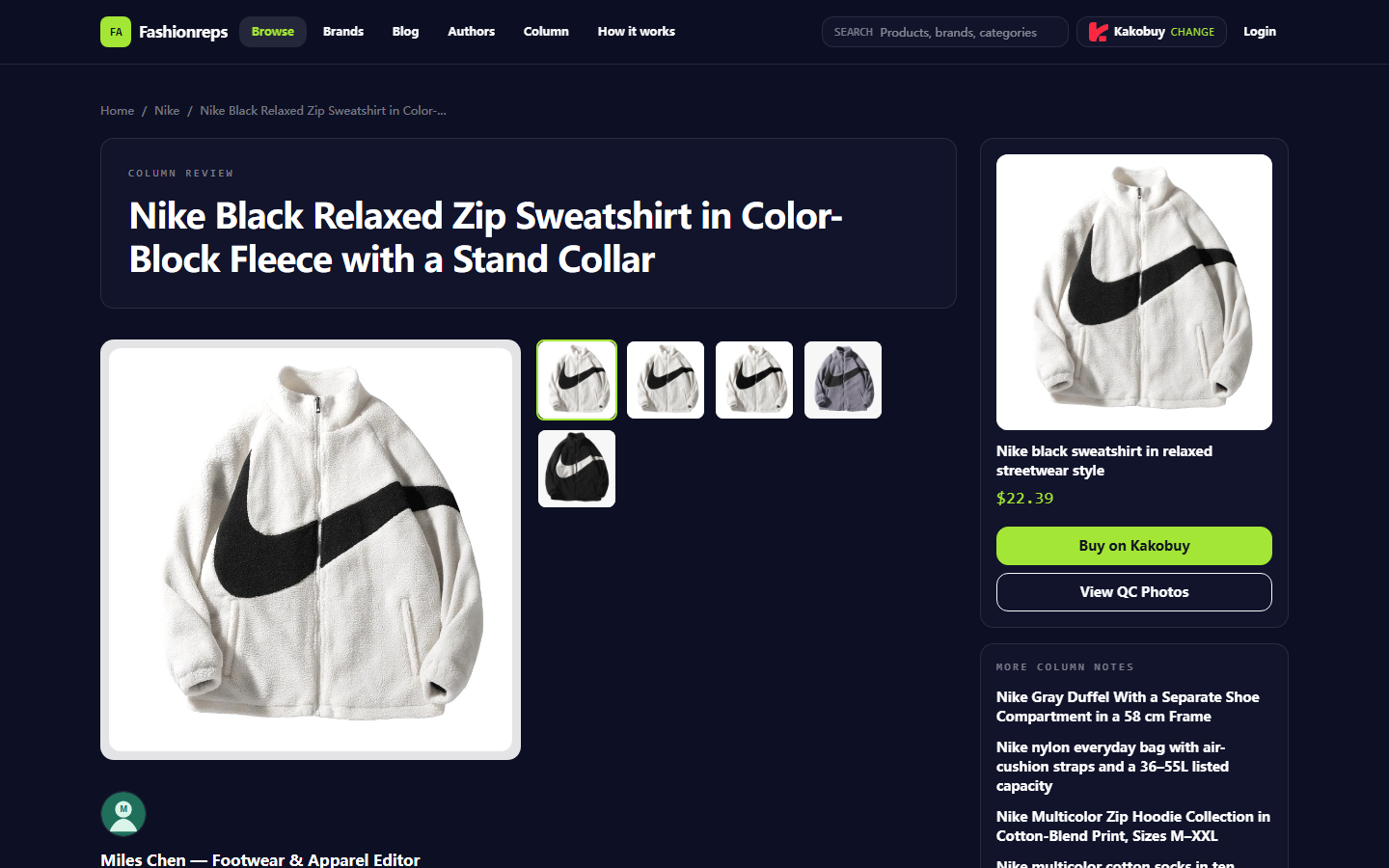

Caption: This article uses the Nike black panel stand-collar zip-up hoodie page on Fashion-reps as an example to explain how to check whether product options stay consistent before checkout.
Which Nike hoodie pre-order inconsistency this article solves
If the Nike hoodie color, size, or style shown on the product page doesn't match the shopping cart, agent platform order page, or checkout page, don't pay right away. This article addresses one issue only: how to locate where the product options change from the product page to the checkout page.
After reading, you should be able to do three things: save the original page evidence, confirm at which step the change occurred, and determine whether it's a selection error, page update, redirect record anomaly, or insufficient information that requires asking for help first.
This article does not apply to after-sales disputes after payment, physical color differences after receiving the product, warehouse QC photos not matching the product page, or orders completed through off-site private chat. The page record date used for verification in this article is October 8, 2026; prices, inventory, available options, and shopping agent rules should still be based on what the page shows at the time you operate.
First save the Nike style, color, and size displayed on the product page
Before clicking Buy or selecting a shopping agent, keep a complete record of the product page. Don't just remember the color name, and don't only capture the price area.
Taking the page verified in this article as an example, the page title describes a Nike black panel stand-collar zip-up hoodie, not a hooded sweatshirt. The page information shows:
- Color options recorded as black, white, and gray.
- Size range recorded as M, L, XL, 2XL, 3XL, and 4XL.
- Style information includes stand collar, zip front, long sleeves, side seam pockets, and loose fit.
- The reference price recorded on the page is $22.39; the final product price, service fee, and international shipping fee need to be confirmed on the shopping agent page.
- The page notes that measurements may have a 1–3 cm error, so size labels cannot replace the seller's flat measurements.
When saving evidence, at least include the product name, product main image or style description, color, size, the page where the product link is located, page date, and reference price. If the page has a product number, seller information, or variant number, save those as well.
Note that a screenshot only proves what the page displayed at the time of the screenshot, not that inventory, price, or variants remain unchanged by checkout. 📝
Check the correspondence among options, notes, and cart
After saving, re-check what you actually selected. It's recommended to record in the order of "style, color, size, quantity" rather than just writing "black L".
You can use the following verification table:
| Check field | Product page record | Cart or order page record | Consistent? |
|---|---|---|---|
| Style | Nike black panel stand-collar zip-up hoodie | Order title or product thumbnail name | Yes / No / Unable to determine |
| Color | Specific color name shown on page | Color name or variant shown in cart | Yes / No / Unable to determine |
| Size | Selected size, e.g., L | Size in cart or order page | Yes / No / Unable to determine |
| Quantity | Actual purchase quantity | Cart quantity | Yes / No / Unable to determine |
| Price | Page reference price $22.39 | Product price shown on agent platform | For amount verification only, not equivalent to final total |
If the cart only shows a thumbnail without explicit color and size, don't treat the thumbnail appearance as proof of the variant. Black, gray, and white styles may use similar images, and a thumbnail is not sufficient to confirm the selection.
If the remark field requires entering color or size, the remark content should also be consistent with the selected variant. For example, if the page selects L but the remark says XL, pause and re-confirm. Remarks are usually auxiliary information and cannot automatically correct wrong options on the page. ⚠️
Locate the change step by step from product page to checkout
Don't skip multiple pages at once. After each step, record the style, color, size, and amount displayed.
Step 1: Before selecting on the product page
Confirm that the page still shows the same style. The page in this article's example is described as a black panel, stand-collar, zip-up hoodie. If the page title suddenly changes to a hoodie, crewneck sweatshirt, different colorway, or different product category, stop and do not continue selecting sizes.
Step 2: After selecting on the product page
After selecting color and size, check whether the page displays a selected summary, variant name, or quantity change. If the color button can be clicked but has no selected state and you cannot confirm that the selection was made, don't click buy directly.
Step 3: Before redirecting to the shopping agent
Record the options before clicking buy. The Buy button on Fashion-reps page will enter the user-selected shopping agent process, and the actual product price, service fee, and international shipping fee are confirmed by the shopping agent page. Therefore, a different amount after redirecting does not automatically indicate a size or color error; check the product variant and fee items separately first.
Step 4: Shopping cart or order draft page
Check the product title, product image, color field, size field, and quantity. If the title only says "Nike sweatshirt" without color or size, mark the status as "insufficient information" rather than assuming it's correct.
Step 5: Pre-payment checkout page
Finally, check the payee, product variant, quantity, product amount, service fee, international shipping fee, and applicable tax description. If the product options differ from the previous step, or if the checkout page cannot display variants, do not pay. 💳
How to request supplementary confirmation when page evidence is missing
When the page does not clearly show color name, size name, variant number, or seller's flat measurements, seek help through the official purchase process provided on the Fashion-reps page or the official customer service channel of the selected shopping agent. Do not post order numbers, complete waybills, passports, payment card information, or other personal data in public comments.
The help request should be as brief and verifiable as possible, and include only necessary fields:
- Product page title or page identification information.
- The color and size you want to purchase.
- Screenshot evidence of the color and size displayed on the product page.
- Corresponding screenshot from the cart or checkout page.
- The specific step where the change occurred, e.g., "Product page selected L, cart shows XL".
- Screenshot date and time zone.
In screenshots, cover name, address, phone, order number, payment information, and any personally identifiable content, but do not cover color, size, product title, price items, or error locations. If customer service asks to confirm variants, prioritize asking them to explicitly state style, color, and size, rather than just replying "can place order".
When to pause ordering or not continue payment
Pause if any of the following occurs:
- The color on the product page and cart is different, and there is no clear variant explanation.
- A certain size was selected on the product page, but the cart or checkout page shows a different size.
- The page changes from a hoodie to a hoodie, jacket, or other style, and cannot be confirmed as the same product.
- The checkout page does not show color and size, and there is no verifiable variant number.
- Color buttons, size buttons, or selected states do not display properly.
- The product names on the product page, cart, and checkout page each point to different styles.
- The page requires supplementary payment through off-site personal accounts, private chat, or unofficial payment methods.
- You can only rely on image color judgment without text variant or customer service confirmation.
Do not continue with the intention of "pay first, modify later". After payment, variant errors may enter the agent purchasing, warehouse receipt, or after-sales process, increasing processing costs and return/exchange risks. 🛑
How to distinguish page updates, selection errors, and record errors
Page updates are usually characterized by overall changes in product title, color list, size list, or price, and the new state remains after refreshing. In this case, re-save the page evidence and then decide whether to continue.
Selection errors usually only affect your current options, for example, the product page still shows the original color and size, but the cart records another item. In this case, return to the product page to re-select, and re-check after redirecting again.
Record errors usually occur during manual note-taking, copying text, or screenshot organization. For example, the page selects L, but personal notes mistakenly write XL. You should rely on the visible fields on the current page and cart, re-organize the records, and not continue payment based on old notes.
When unable to determine, mark the status as "unconfirmed" rather than guessing. For Nike loose-fit hoodies, page size and fit may also be affected by flat measurements, measurement errors, and personal wearing preferences; this is a size adaptation issue and cannot be used to prove that the color or order variant is correct.
Screenshots and fields to include when submitting a help request
It's recommended to prepare three sets of screenshots and name them in order:
- Product page screenshot: including product title, style description, color or size options.
- After-selection screenshot: including selected color, selected size, and quantity.
- Cart or checkout screenshot: including product name, variant fields, and amount items.
Each screenshot should retain necessary context, not just a color button or a price number. If the page cannot display all information at once, you can split into multiple screenshots, but keep the chronological order.
Before submitting, check again for personal information leakage. Public help requests should only keep fields that can locate the problem, and order numbers and complete shipping information should be covered. If customer service needs order identification information, use the platform's private support channel and submit only the minimum necessary content.
Final action: Complete consistency check before deciding to order
Before payment, you can use this final check:
- The product name is still the target Nike hoodie, not a similar style.
- The color names on the product page, cart, and checkout page are consistent.
- The sizes on the product page, cart, and checkout page are consistent.
- Quantity, remarks, and variant numbers do not conflict.
- Price changes can be explained by product price, service fee, shipping fee, or tax items.
- The page does not require bypassing platform processes through unofficial channels.
- Screenshots are saved and personal information is covered.
If all fields are consistent, still understand that this only proves that the order page records are consistent, not that inventory, physical color, fabric performance, or final size effect are guaranteed. If any key field cannot be confirmed, pause and seek help from official channels first. ✅
Article image
Agent platform shopping FAQ
1. What steps should I follow on mulebuyus.com if the item I received doesn't meet my expectations?
Reach out to mulebuyus.com's customer support without delay. For most non-specialty products from Chinese sellers, there is a 5-day unconditional return and exchange window. You may initiate a return if you are not happy with the purchase. If the product has already been delivered to you and you find a defect, you must contact mulebuyus.com's support team so they can assist in communicating with the seller to work out a resolution.
Customer service email addresses for each platform are listed below:
kakobuy: service@kakobuy.com
oopbuy: support01@oopbuy.com
usfans: support@usfans.com
hipobuy: care@hipobuy.com
superbuy: care@superbuy.com
2. Why doesn't mulebuyus.com rely on Google Sheets for product listings?
Google Sheets works well only for small spreadsheets with few products. As the product count grows, the loading performance degrades severely and the interface becomes laggy. This is particularly noticeable on mobile devices, where the display is poor and finding a specific product is very cumbersome. For the identical set of products, the spreadsheet on mulebuyus.com loads faster and provides a much better visual experience.
3. How do I find a specific product I want to buy on mulebuyus.com?
You can search with a single keyword or navigate to a category page, which also groups products by brand. Longer search queries generally yield fewer results than shorter ones, but they are more accurate.
For instance, you could search for "Air Force 1 White," "sneakers," or just "Air Force 1."
4. What kinds of products are available on mulebuyus.com?
mulebuyus.com offers a wide variety of product categories, such as shoes, T-shirts, sweaters, hoodies, jeans, sweatpants, shorts, beach shorts, factory clearance items, down jackets, baseball jerseys, shirts, hats, jewelry, bags, electronics, sunglasses, socks, underwear, and trendy collectibles.
Community feedback (0)