Pandabuy Drew House Cost Snapshot Guide
Introduction If you're preparing to record the settlement cost of a [drew house](https://fashion-reps.net/brand/drew-house) accessory or related item, the first step isn't to treat the price listed on the page as the final out-of-pocket cost—it's to create a reviewable cost snapshot. The snapshot should separately record the item amount, currency, quantity, service fee, payment processing fee, exchange rate, packaging, and international shipping, plus the query time for each piece of information
- Published
- Editors
- Nathaniel Brooks · Editor-in-Chief and Founder
- Record updated
- Editor score
- 4.2 / 5
Introduction
If you're preparing to record the settlement cost of a drew house accessory or related item, the first step isn't to treat the price listed on the page as the final out-of-pocket cost—it's to create a reviewable cost snapshot. The snapshot should separately record the item amount, currency, quantity, service fee, payment processing fee, exchange rate, packaging, and international shipping, plus the query time for each piece of information. That way, even if the page price, stock, shipping line, or exchange rate changes, you can tell which item changed. 🧾
First, it's important to note that the knowledge base indicates Pandabuy has already shut down on April 11, 2024, due to intellectual property issues. Therefore, this article does not describe Pandabuy as a currently available ordering, payment, or shipping channel, and it does not provide unverifiable real-time prices, stock, fees, or settlement results. The following is suitable for organizing product information visible on Fashionreps, preserving historical page evidence, or reusing the cost recording method on currently available shopping agent pages.
The task this article addresses: archiving settlement amounts for drew house accessories
This article focuses on just one task: before payment, create a cost record for one or a group of drew house accessories that can be reviewed. After reading, you should be able to:
- Record the product name, specific style, quantity, and the currency displayed on the page.
- Separately save the item amount, service fee, payment fee, packaging fee, and international shipping.
- Record the exchange rate, destination, weight or chargeable weight, and the query time for each piece of information.
- Distinguish between amounts already confirmed by the page, amounts awaiting confirmation on the settlement page, and amounts that cannot be confirmed at this time.
- Pause payment when evidence is insufficient, rather than using an estimated value to replace final fees.
This article does not apply to scenarios requiring current Pandabuy settlement links, real-time inventory, real-time shipping costs, or completed order amounts, because there is no verifiable current page evidence for such information. It also cannot prove product authenticity, brand authorization, material authenticity, or final import duties.

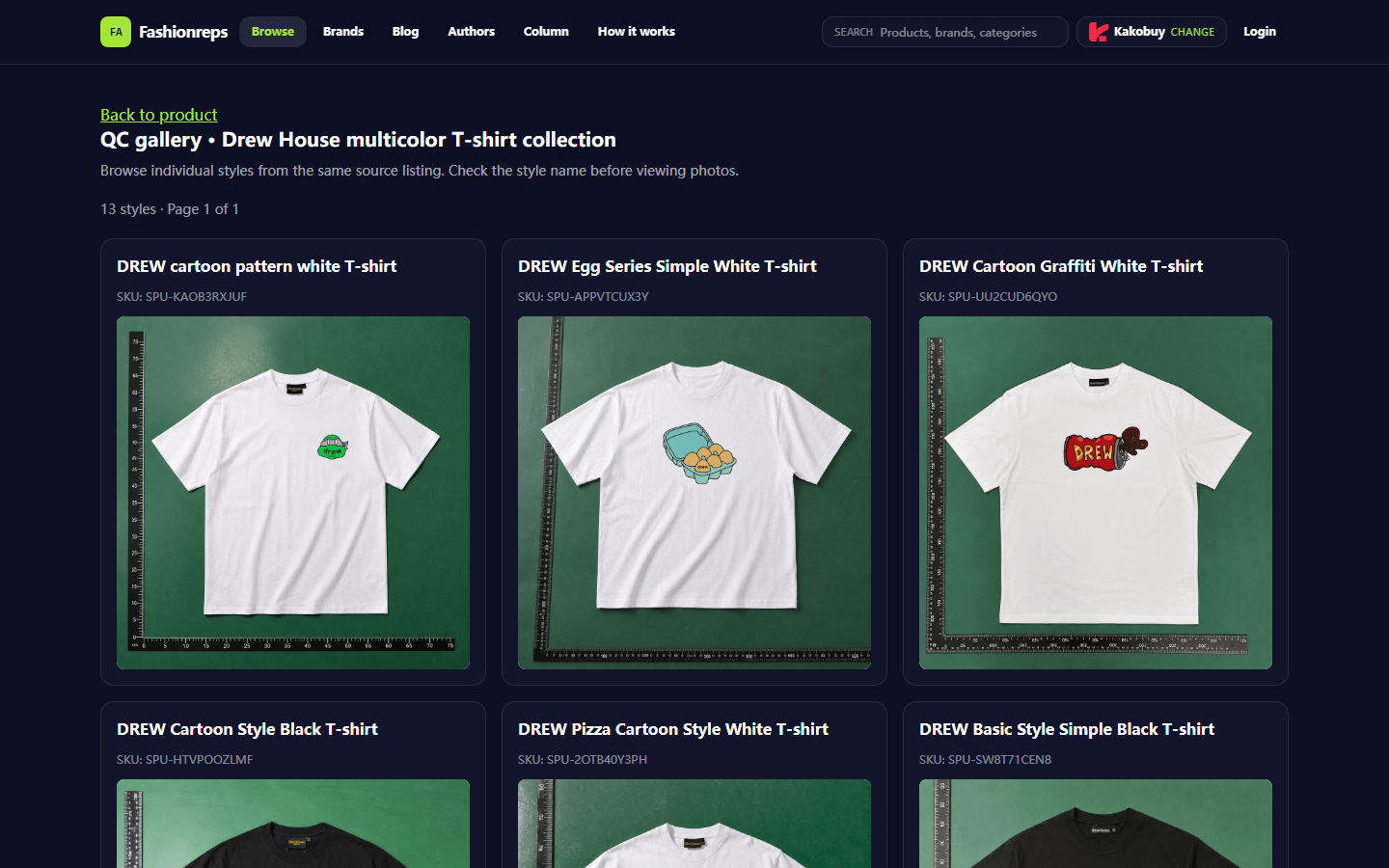
Image: Example of a QC page for multiple styles of Drew House products on Fashionreps. This image is used to identify styles and record page evidence; it does not represent current stock, price, or available purchase channels.
Verify styles, quantities, specifications, and page timestamps visible on Fashionreps
Relevant QC pages on Fashionreps show that Drew House multi-style pages include multiple independent styles, such as white or black t-shirts with different patterns and SKUs. The page information can be used to distinguish specific styles, but it alone cannot prove current price, stock, seller promises, or purchase availability. When viewing the page, first confirm that you are recording a specific style, not treating the entire collection page as one product.
It is recommended to save identifying information in the following order:
- Page title or product name.
- Specific style name.
- SKU or other product identifier displayed on the page.
- Purchase quantity and specifications, such as color, size, or accessory combination.
- Page URL and query time.
- Whether the page still opens properly, and whether there are redirects, blank content, or missing product information.
If the same product has multiple styles, don't just save a vague name like "drew house accessories." The subsequent item price, weight, packaging, and return/exchange conditions may all be related to the specific style. 🔎
How to establish a basic record for item amount, currency, quantity, and service fee
The basic record should list item amount and quantity separately. A simple calculation relationship is:
Item subtotal = unit item amount × quantity
If the page also displays domestic (China mainland) shipping, it should be listed separately, not merged into the unit item price. Only amounts clearly displayed on the page can be written in the "confirmed" column; items without page evidence should be marked as "to be confirmed."
| Fee item | What to record | Evidence requirement |
|---|---|---|
| Item amount | Unit amount, currency, quantity, style | Amount visible on product page or settlement page |
| Domestic shipping | Shipping from seller to warehouse, whether calculated per order | Seller page, cart, or agent settlement page |
| Agent service fee | Rate or fixed amount, applicable conditions | Current agent official fee description or settlement page |
| Payment fee | Payment method, fee amount or rate | Current payment page or official fee description |
| International shipping | Route, destination, chargeable weight, amount | Current shipping calculator or settlement page |
| Customs declaration or additional fees | Item name, currency, applicable conditions | Official route description or settlement page |
The knowledge base material about Kakobuy gives a fee breakdown of "product cost, international shipping, and customs declaration fee," but this is not Pandabuy's current rate, nor can it be automatically applied to Fashionreps pages or other agents. Unless the current official page clearly displays it, do not treat the amounts in that material as actual fees for this drew house scenario.
How to separately save exchange rates, payment fees, and page query times
Exchange rates are not part of the product price; they should be recorded separately with source, direction, and time. For example, record whether it is "CNY to USD" or "USD to CNY," and note whether the exchange rate is a payment institution quote, bank card billing rate, agent page conversion, or a self-queried reference rate.
It is recommended to save at least the following fields:
- Query date and specific time, preferably including time zone.
- Original amount and original currency.
- Converted display amount and target currency.
- Exchange rate value used and its source.
- Whether it includes payment institution markup, cross-border transaction fee, or currency conversion fee.
- Whether the actual charge may vary depending on the posting time.
If the payment fee is only shown at the final step, do not enter an estimated number at the product page stage. You can first write "to be confirmed on settlement page" and fill in the actual amount before payment. 💳
A reviewable record format is as follows:
Original item subtotal: CNY amount, quantity as actually selected
Reference exchange rate: record query time, conversion direction, and source
Payment fee: not shown, fixed amount, or percentage, subject to payment page
Target currency estimate: for budgeting only, not a commitment to final charge
How to await official page confirmation for packaging, international shipping, and possible additional fees
International shipping usually cannot be inferred from the product name alone. It may depend on destination, actual package weight, volumetric weight, route, packaging handling, declaration information, and current route rules. If drew house accessories are combined with other items, the total package weight, volume, and declared amount may also change, so a single product page is usually insufficient to confirm the final shipping cost.
There is no universal answer for combining or splitting packages:
- Combining may reduce duplicate first weight or some handling costs, but may increase package value, volumetric weight, and single-package loss risk.
- Splitting may increase fixed handling fees, but is easier to manage in terms of route restrictions, weight limits, or risk diversification.
- Reinforcement packaging, removal of outer packaging, or special handling may change weight, volume, and transportability.
- Destination country taxes, import restrictions, and customs clearance documents should be based on official requirements of the destination country and the carrier's instructions, and should not reduce the book amount through under-declaration, splitting orders to avoid tax, or evading inspection.
Without current official calculator or settlement page evidence, this article does not provide specific international shipping, packaging, tax, or customs declaration amounts. Any budget should be clearly labeled as a budget, not a final out-of-pocket cost. 📦
From product page, cart, to settlement page: preserve cost evidence step by step
The first step is to save product page evidence. Record specific style, quantity, specifications, item amount, currency, page status, and query time. If the product page has no price or the price is inaccessible, keep the status "price not verified" rather than filling it with search summaries or old screenshots.
The second step is to save cart evidence. Confirm quantities are correct, whether different styles were added, and whether domestic shipping, service fees, or discount conditions appear. The item quantities in the cart should be compared item by item with the basic record to avoid merging multiple styles into one vague name.
The third step is to save settlement page evidence. Before payment, focus on checking:
- Is the destination country/region correct?
- Is the shipping route and carrier clear?
- Is actual weight or chargeable weight displayed?
- Are international shipping, packaging fee, service fee, and payment fee itemized?
- Has the exchange rate or target currency changed?
- Are there any prompts for taxes, declaration, prohibited items, or additional documentation?
- Does the final payable amount match the sum of the items recorded?
Every page change should create a new timestamped record, not overwrite the old one. This allows you to see whether the total changed due to product price change, exchange rate change, or change in shipping and service fees. ⏱️
What cannot be inferred from a single page snapshot about final out-of-pocket cost range
A single snapshot can at most prove what the page displayed at a certain point in time, not the final outcome of the entire transaction lifecycle. The following items cannot be inferred from just the product page or QC images:
- Whether ordering or payment is currently possible.
- Whether the product is in stock or the seller still accepts purchase orders.
- Whether the product complies with brand, intellectual property, or destination country import requirements.
- Whether additional handling, return, or repackaging fees will arise after warehouse inspection.
- Actual weight and volumetric weight after combining packages.
- Whether the logistics route is still open and whether transit times are stable.
- Destination country taxes, customs clearance fees, or temporary carrier surcharges.
- Actual out-of-pocket cost after receiving the goods.
In particular, note that the shutdown of Pandabuy means historical pages, old fee screenshots, or past purchase flows cannot be packaged as a currently executable Pandabuy settlement plan. To continue trading, you must first confirm a new agent, current official fee descriptions, current routes, and payment pages, then rebuild the snapshot.
Pre-payment cost review checklist for drew house and stop conditions
Before payment, you can use the following review checklist:
- Product name and specific style are clear.
- Quantity, color, size, or accessory specifications are verified.
- Item amount and currency come from an accessible page.
- Whether domestic shipping exists is confirmed.
- Service fee and payment fee are listed separately.
- Exchange rate direction, value, source, and query time are recorded.
- Destination, route, and chargeable weight are confirmed, or clearly marked as to be confirmed.
- Packaging, customs, taxes, and additional fees are not miswritten as known amounts.
- Settlement page total can be cross-checked with itemized amounts.
- There are no unexplained redirects, blank pages, duplicate charges, or payment anomalies.
Stop operations and re-verify if any of the following occur:
- Only old screenshots are available; cannot open current product or settlement page.
- Page does not clearly show product name, amount, currency, or applicable conditions.
- Agent name, payment entity, or payee information differs from expectations.
- Exchange rate or payment fee is only displayed after payment.
- Shipping fee has no destination, weight, or route conditions.
- Settlement page amount cannot be reconciled with item subtotal and known fees.
- Page requires under-declaration, order splitting to avoid tax, or other methods to evade customs inspection.
- Unnecessary complete order, passport, payment card, or shipping label information is requested.
Conclusion
The value of a cost snapshot is not in guessing an exact-looking total in advance, but in separating known amounts, amounts to be confirmed, and risks that cannot be inferred from current evidence. For the drew house scenario, combining packages may save duplicate first weight or handling costs, but increases package value, volumetric weight, and single-package loss risk; splitting packages may increase fixed fees, but may be more suitable for route restrictions or risk diversification. Ultimately, decisions should be based on current page samples, destination, weight, and settlement evidence, rather than applying historical Pandabuy rates or other agents' fees.
This method is suitable for those who need to preserve budget evidence before payment, compare different options, or review team purchasing records. It is not recommended to continue when the current platform status, payment entity, shipping conditions, or customs clearance requirements cannot be confirmed.
Community feedback (5)
Reader score 4.2 / 5 (5 ratings)