Spain Jersey Catalog to Google Sheets: Track Variants
## First, Clarify: The Website is for Discovery, the Sheet is for Filtering If you're screening candidates for a [Spain jersey](https://fashion-reps.net/jersey/spain), the easiest confusion is putting "what I saw on the page" and "whether it's currently suitable to continue checking" in the same cell. A more reliable approach is to first discover candidates in the fashion-reps product catalog and detail pages, then record the style, size, SKU, image entry, and link status separately in Google Sh
- Published
- Editors
- Nathaniel Brooks · Editor-in-Chief and Founder
- Record updated
- Editor score
- 4.2 / 5
First, Clarify: The Website is for Discovery, the Sheet is for Filtering
If you're screening candidates for a Spain jersey, the easiest confusion is putting "what I saw on the page" and "whether it's currently suitable to continue checking" in the same cell. A more reliable approach is to first discover candidates in the fashion-reps product catalog and detail pages, then record the style, size, SKU, image entry, and link status separately in Google Sheets.
The point of organizing this way is not to prove the product is in stock, nor to predict price or shipping, but to quickly answer three questions next time you review: What style is this? What variants did the page provide at that time? What still needs to be checked with this link?

Start Recording from the Catalog Page
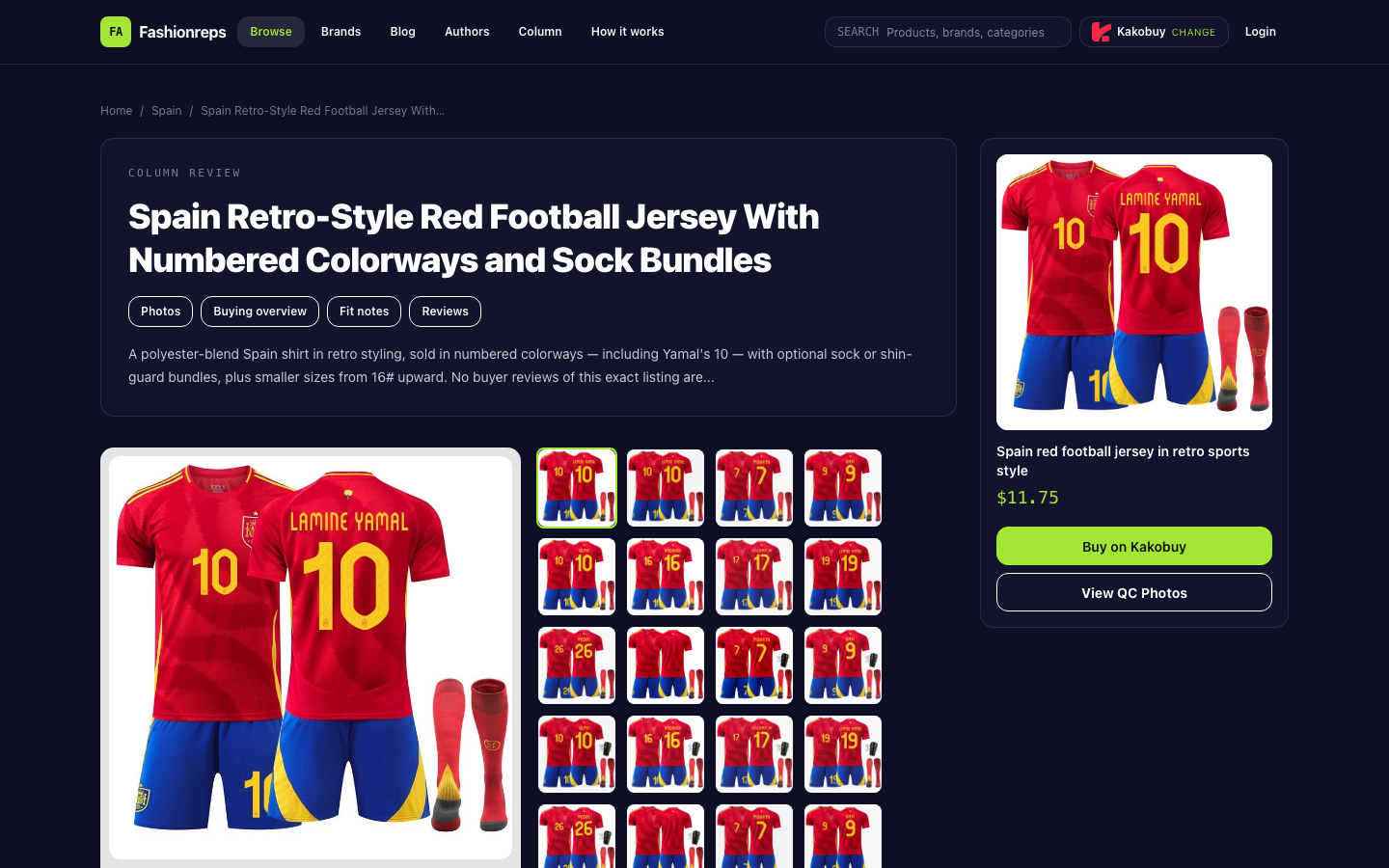
The fashion-reps website can be browsed by brand, blog, author categories, and search entry, and you can also view product information from the product page. For this Spain jersey, the catalog page is suitable for confirming the candidate name, while the detail page is used to supplement colors, numbers, size ranges, image entries, and product links.
When you first see a candidate, don't just copy the product title. Create a basic record and keep the fields from the page that can be directly cross-checked:
- Style name: Record the full name shown on the page, avoid writing only "Spain jersey".
- Color or colorway: Distinguish the red base, numbered versions, and other catalog options.
- Number or printing: The page lists numbered options including Yamal 10, record as actually shown on the page.
- Set contents: Record single piece, socks combo, or socks plus shin guards combo separately.
- Size: Keep the original ranges shown on the page, such as 16# to 28#, XS to 3XL; do not infer the age group corresponding to numeric sizes.
- SKU: If the detail page shows an SKU, save it as is; if not shown, leave blank, do not use the title as a substitute.
- Image entry: Record the detail page or QC image entry for later review of collar, print, and specific variants.
- Product link: Save the current detail page URL and write down the query date.
Use One Sheet to Separate Style and Status
The table below is a field design suitable for a single candidate. It separates product attributes from review status, avoiding mistaking "the page has this option" for "currently available".
| Field | How to record for this candidate | Filling boundary |
|---|---|---|
| Style name | Spain retro-style red football jersey | Use the detail page name, do not rewrite as official style name |
| Color and number | Red; can record blank, numbered, and Yamal 10 options as shown | Only record options listed on the page |
| Set | Single piece, socks, or socks plus shin guards combo | Do not treat set options as proof of stock |
| Size | 16#–28#; XS–3XL | Keep original format; correspondence of numeric range needs seller confirmation |
| SKU | Fill in as shown if page displays it | Leave blank if not shown |
| Image entry | Detail images or QC image entry | Images are for checking current page info, not equivalent to personal inspection |
| Product link | Save the detail page link | Reconfirm it still points to the same product each time you open it |
| Query time | Record viewing date and time | Helps determine if information needs rechecking |
| Page status | Seen in catalog, detail checked, variant missing, or link needs review | Status only describes checking progress, not inventory |
How to Fill in for This Spain Jersey
Current page information shows this is a Spain red jersey in a retro style, described as a polyester blend outer layer with a lining of the same material, and the fit is listed as unisex adult. The catalog shows two size ranges: 16# to 28# and XS to 3XL, and also lists options for blank, numbered, and combos with socks or socks plus shin guards.
These contents are suitable for the "style and variant" field, but you should not further infer that numeric sizes are definitely children's sizes, nor treat the listed options as current stock. A more reliable recording method is to keep the original wording and note "need to confirm the corresponding range for numeric sizes" in the remarks.
The page also hints that this specific product has no buyer review records for reference. Therefore, you can add a column "Evidence notes" in Google Sheets and write "no buyer reviews for this specific link", do not merge reviews from other Spain jerseys or other products into this row.
Set Clear Four-Level Values for Link Status
It's recommended to use only limited status values to avoid different wording among people. A review can proceed in the following order:
- Seen in catalog: Found the candidate only in catalog or search results, haven't opened the detail page yet.
- Detail checked: Opened the detail page and recorded name, variants, sizes, and image entry.
- Variant missing: Detail page still exists, but a certain color, number, set, or size that needs recording has no clear correspondence.
- Link needs review: Page cannot open normally, content is inconsistent with previous record, or whether the link still points to the same product is not confirmed.
"Detail checked" does not equal "in stock" nor "suitable for ordering". If the page reopens with only part of the variants, change the status to "variant missing" and specify what is missing in the remarks.
How to Reduce Duplicate Checks in Google Sheets
The value of a sheet is providing a fixed entry for filtering and collaboration. You can split columns for "size pending confirmation", "number pending confirmation", "image pending review", and "link needs review", and use dropdown options for consistent filling. This way, when filtering, you can first find rows still lacking evidence instead of repeatedly opening all product pages.
For multi-person collaboration, it's recommended that one person is responsible for modifying product attributes, another only updates review status and remarks, and keep query time. If two people open the same link, first check if SKU, number, and set contents are consistent before deciding whether to merge records. When there is no SKU, do not merge two candidate rows based solely on similar titles.
The website is better for actions like discovering, searching, viewing images, and opening product details; Google Sheets is better for saving structured fields, filtering incomplete items, and adding collaboration notes. Do not assume automatic synchronization between the two; the content in the sheet still needs to be based on the reopened detail page.
When to Stop Listing It as a Candidate
After reopening the detail page, if the product link is invalid, the page no longer corresponds to the original product, or key variants cannot be confirmed, keep the status as "link needs review" or "variant missing", and do not continue writing it as a purchasable recommendation.
If you only need to record a Spain jersey candidate, you can first save the style, color, size, number, and link shown on the page, and wait for missing information to be confirmed. Only when the detail page is still accessible, SKU or variant relationships are clear, and size issues are explained, is it appropriate to advance the status to the next step. This process makes the sheet a reviewable catalog record, not speculation about inventory, price, or long-term link validity.
Community feedback (0)